
The Feelings Wheel Emotion Tracker and Journaling App
Name what you feel. See what it means.
The same wheel on paper — one page, sized for A4.
Download the PDFHow a check-in works
Four steps, thirty seconds total: pick a feeling from the wheel, tag what was going on around it, add a note if you want one, and it is logged. No screen here is a photograph of the app — this is the sequence, laid out so you can see what actually happens before you install anything.
- 1
Pick a feeling
Tap a wedge on the wheel — as broad or as specific as fits the moment.
- 2
Add context
Tag what was going on around it. One tap, and it is optional.
- 3
Write a note
A line or two if you want one, or none at all.
- 4
Logged
Thirty seconds, done — one more point in the pattern you are building.
Two words often both fit, and sometimes none does. How to use the wheel is about that part.
What the feelings wheel app does
The pieces work together rather than separately: name the feeling on the wheel, tag the context around it, add a note when you want one. What you end up with is an emotion tracker and a journal in the same place, so the word you chose and the sentence you wrote stay attached to the day they belong to.
What the app shows you
A few check-ins are just entries; a few weeks of them are a shape. The app groups what you logged by day and by feeling, so a pattern — something like more irritation on Mondays, or calmer evenings after a walk — becomes something you can see instead of something you only sort of remember.
Free download: the printable feelings wheel
The same wheel this site is built on, as a one-page PDF sized for A4. Print it for a wall, a fridge, or a table where a conversation happens. Colour matters on paper: the 7 hues are how you navigate it without tapping anything.
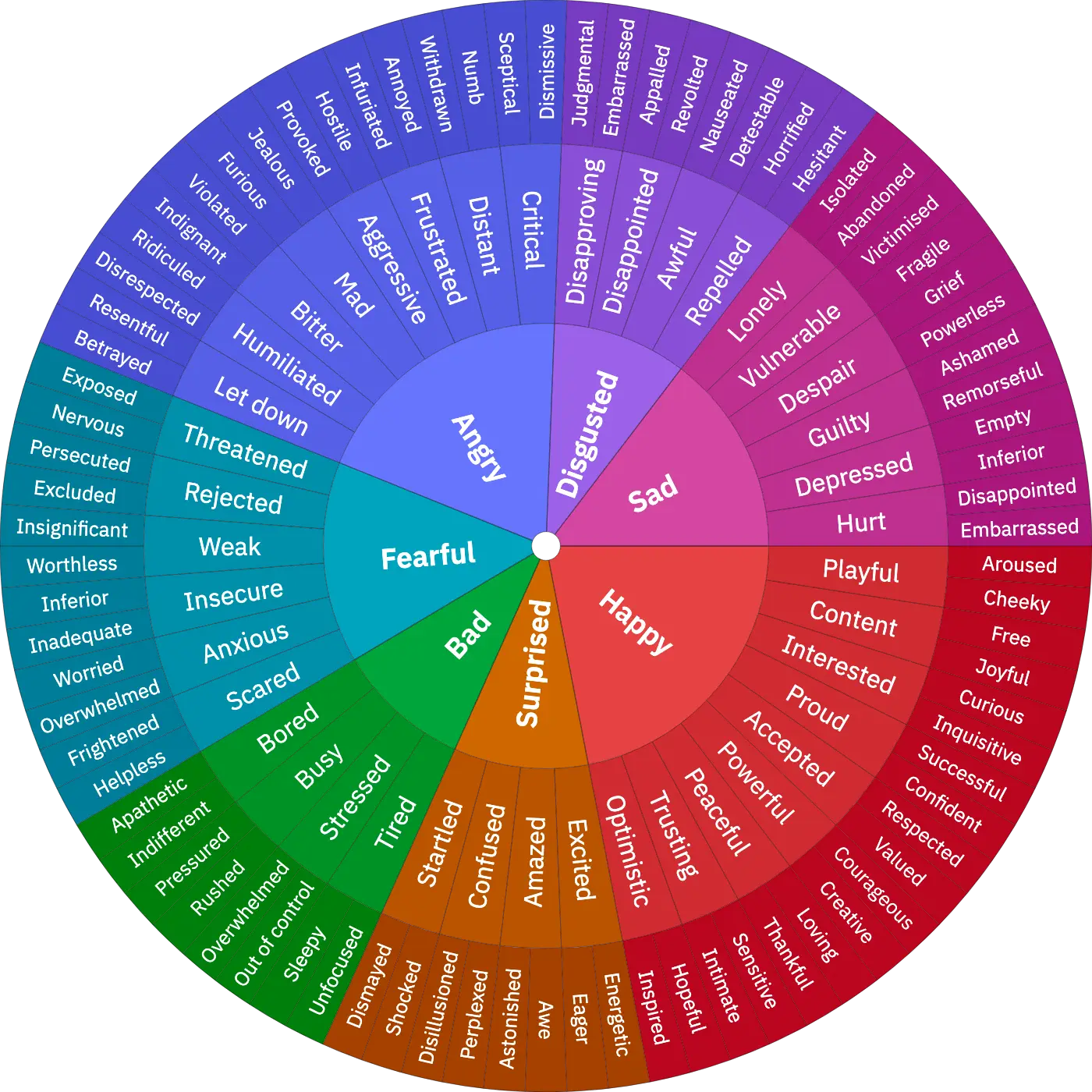
Every feeling on the wheel, all 121
Most apps give you five faces. This is the whole vocabulary: 7 core feelings, 39 in the ring around them and 75 beyond that, each with its own page. Start with the core that feels closest and move outward only as far as you honestly can — a broad word you believe beats a precise one you do not.
- Happy
- Playful
- Aroused
- Cheeky
- Content
- Free
- Joyful
- Proud
- Confident
- Successful
- Peaceful
- Thankful
- Loving
- Interested
- Curious
- Inquisitive
- Accepted
- Respected
- Valued
- Powerful
- Courageous
- Creative
- Surprised
- Startled
- Shocked
- Dismayed
- Confused
- Disillusioned
- Perplexed
- Amazed
- Astonished
- Awe
- Excited
- Eager
- Energetic
- Bad
- Tired
- Unfocused
- Sleepy
- Stressed
- Out of control
- Busy
- Rushed
- Pressured
- Bored
- Indifferent
- Apathetic
- Fearful
- Scared
- Helpless
- Frightened
- Anxious
- Overwhelmed
- Worried
- Insecure
- Inadequate
- Inferior
- Rejected
- Excluded
- Persecuted
- Weak
- Worthless
- Insignificant
- Threatened
- Nervous
- Exposed
- Angry
- Frustrated
- Infuriated
- Annoyed
- Distant
- Withdrawn
- Numb
- Critical
- Skeptical
- Dismissive
- Mad
- Furious
- Jealous
- Let down
- Betrayed
- Resentful
- Humiliated
- Disrespected
- Ridiculed
- Bitter
- Indignant
- Violated
- Aggressive
- Provoked
- Hostile
- Disgusted
- Disapproving
- Judgmental
- Embarrassed
- Awful
- Nauseated
- Detestable
- Repelled
- Horrified
- Hesitant
- Repugnant
- Revolted
- Loathing
- Sad
- Lonely
- Isolated
- Abandoned
- Guilty
- Ashamed
- Remorseful
- Despair
- Grief
- Powerless
- Hurt
- Disappointed
- Fragile
- Vulnerable
- Victimized
- Depressed
- Empty
Questions people ask before installing
Is MyFeelings free?
The wheel, check-ins, notes, tags, practices and your stats are free to use, with no trial clock. Anything that is ever paid for will say so before you buy it.
Does it work offline?
Check-ins are written to your phone first, so you can log one with no connection at all and it is there waiting when you come back.
What is a feelings wheel?
A map of emotion words arranged from general to specific. The middle holds a handful of broad feelings; each ring outward splits them into narrower ones until the word fits.
Is my data private?
Your check-ins are stored in your account so they follow you between devices, and the privacy policy sets out exactly what is held and who processes it. You can export or delete everything from inside the app.
Do I need to check in every day?
No. A week with three check-ins still shows you a pattern. The app counts what you logged and never scores you on what you did not.
Can I export or delete everything?
Yes, both, from inside the app and without asking anyone. Export produces a plain file you keep; delete removes the check-ins from the device.
Is this therapy or a mental-health treatment?
No. Tracking is not treatment. A record of your check-ins can be useful to bring to an appointment, but it is not a substitute for one and it diagnoses nothing.
How is this different from a 1–5 mood slider?
A slider records how bad or good a day was. The wheel records what the day actually was, and leaves you with a word you can look up, act on, and recognise next time.